

The Best Home Interior design Apps to Style Your Space

Feeling overwhelmed by paint swatches or wondering if that dream sofa will actually fit in your living room? You're not alone! Thankfully, apps like Planner 5D and Houzz are absolute lifesavers for anyone tackling a home project. They're fantastic tools that let you visualize furniture in your room, play with color schemes, and map out floor plans, all from your phone or tablet. You can finally stop guessing and start seeing, which helps you make smart, confident decisions before you spend a dime.
Visualize Your Dream Home Without The Guesswork
Have you ever stood in the paint aisle, staring at a wall of what feels like a thousand shades of white, and just felt completely lost? Or maybe you found the perfect sofa online but held off because you were terrified it would completely overpower your living room. We’ve all been there. These are the exact headaches that the best home interior design apps are made to cure. They’re basically a digital playground for your home where you can try out any idea without the risk.

These apps help you take your ideas from a vague concept in your head to something you can actually see. So, instead of just wondering if a dark green accent wall would work, you can snap a picture of your bedroom, upload it to an app like RoomGPT, and get a surprisingly realistic preview in seconds. For anyone who has a hard time picturing the finished product, it’s a total game-changer.
What Can You Accomplish with Design Apps?
And don't think these tools are just for the pros. They’re built for everyday people living in real homes, offering a ton of features for everything from a quick room refresh to planning finishes for a new space. Our guide on how to design your own home online has even more tips for getting comfortable with these tools.
Here’s a quick rundown of what you can do:
Experiment with Layouts: Shuffle furniture around your room virtually to see what flows best—no back-breaking work required.
Test Colors and Materials: Instantly see how different paint colors, flooring options, or even kitchen countertops will look in your space.
Place Virtual Furniture: Use augmented reality (AR) to check if that cool armchair from IKEA actually fits in that awkward corner.
Create Accurate Floor Plans: Map out your room’s exact dimensions to make sure every piece you buy will fit just right.
The real magic here is confidence. When you can test your ideas digitally first, you get to skip the costly mistakes and feel genuinely good about your design choices. It’s all about making sure the end result is a home you absolutely love.
While my expertise is in helping buyers get into a high-quality new home, my real passion is helping you bring your vision to life inside those walls. When you’re choosing your own flooring, cabinets, and tile in one of our homes in White Marsh or anywhere in Baltimore and Harford County, Maryland, these apps are a great starting point. The ideas you bring complement the hands-on service and unique visualization tools I provide, ensuring we create a space that’s uniquely yours.
Understanding The Features That Actually Matter
Not all interior design apps are created equal. The right one for you really boils down to what you're trying to do. Are you just trying to see if a new rug clashes with your curtains, or are you picking out finishes for your entire kitchen? Your goal determines the tools you need.
Let’s break down the core features that make these apps so powerful. Think of it like buying a car—some folks just need a reliable ride to get from A to B, while others want every single bell and whistle for a cross-country road trip.
From 2D Blueprints To 3D Walkthroughs
Most design projects start with a 2D floor plan. This is your basic bird's-eye view of the room, like a simple blueprint. It's the best way to get the layout right from the start and make sure everything actually fits. Most apps make this part pretty painless, letting you drag and drop walls, doors, and furniture to map out your space.
But the real "wow" moment happens with 3D rendering. This is where your flat, boring 2D plan gets turned into a stunningly realistic, three-dimensional model. You can suddenly "walk" through your new room, see how the morning light hits the new paint color, and get a genuine feel for the space. It’s the difference between looking at a map and actually standing on the street corner. This is a must-have if you have trouble visualizing the final look.
This screenshot from Homestyler shows you exactly what I mean. It perfectly captures that jump from a flat 2D floor plan to a vibrant, lifelike 3D render. Seeing your design in 3D gives you the confidence to make the right calls on everything from furniture scale to color palettes.
Augmented Reality: The Ultimate Try-Before-You-Buy
The most exciting feature popping up in the best home interior design apps has to be Augmented Reality (AR). Instead of building a virtual room from scratch, AR uses your phone’s camera to drop digital items right into your actual room.
Practical example: Ever wonder how that navy blue sofa from Wayfair would look against your brick wall? Just point your camera. The app places a true-to-scale 3D model of the sofa right in your living room. Honestly, this feature is a game-changer for avoiding that sinking feeling of buyer's remorse. To get a better sense of what these tools can do, this guide to furniture arrangement apps is a great read and really highlights this crucial feature.
It's no surprise that immersive tech is taking over. In fact, 3D interior design software already holds a massive 56.62% of the market share, which just goes to show how much people want realistic previews. The whole industry is leaning this way, with AR and VR platforms expected to blow up, letting people truly experience their new spaces before spending a dime.
Essential Features For Practical Planning
Beyond the flashy visuals, there are a few nuts-and-bolts features that are crucial for any successful project. Understanding these will help you pick an app that actually works for you. If you’re just dipping your toes in, our simple guide to home design software for beginners is a great place to start.
Here's what I always tell people to look for:
Massive Product Libraries: An app is only as good as its catalog. You want one with huge, updated libraries of real furniture, decor, and materials from brands you know and love. This way, you're designing with stuff you can actually go out and buy.
Accurate Measurement Tools: Some apps use your phone’s camera (especially iPhones with LiDAR) to take surprisingly accurate measurements. You should always double-check with a real tape measure before ordering, but it's fantastic for getting your initial layout right.
Material and Color Customization: The ability to play with different finishes is everything. A great app will let you change wall colors on the fly, swap out hardwood for tile, and see how that quartz countertop really looks in your kitchen.
When my clients in White Marsh or Edgewood are trying to pick their finishes, using an app to test a few ideas first is an amazing first step. They come to our design meetings with a much clearer vision, which we can then bring to life with my hands-on service and proprietary visualization tools.
Getting Real: A Practical Comparison Of Top Design Apps
Alright, let’s get down to the fun part and put a few of the most popular apps head-to-head. Instead of just rattling off a list of features, we’re going to look at how these tools actually perform in situations you'll face during a real project.
The best home interior design app isn’t the one with the most bells and whistles—it’s the one that solves your specific problem without giving you a headache. We'll pit a few crowd favorites against each other to see how they stack up for different jobs, from just getting inspired to mapping out a detailed floor plan. This way, you can see the subtle differences and pick the tool that really fits your goal.
Feature Showdown: The Best Home Interior Design Apps
To give you a quick birds-eye view, here's a side-by-side look at some of the key players. This table breaks down what each app does best, who it's for, and what you can expect in terms of features and cost.
App Name | Best For | Key Features | Ease of Use | Pricing Model |
|---|---|---|---|---|
Houzz | Inspiration & Product Discovery | Massive photo library, shoppable products, "View in My Room" AR feature, professional directory. | Very Easy | Free (In-app purchases) |
Planner 5D | Detailed 2D/3D Floor Planning | Drag-and-drop floor plans, large item catalog, 3D "walk-through" view, HD renders. | Moderate | Freemium (Subscriptions unlock more features) |
Magicplan | Quick & Accurate Floor Plans | Uses your phone's camera to measure and draw floor plans automatically, generates reports. | Easy | Subscription-based |
IKEA Place | AR Furniture Visualization | True-to-scale AR models of IKEA furniture, simple "place and see" functionality. | Very Easy | Free |
Homestyler | Photorealistic 3D Rendering | High-quality 3D renders, uses real furniture brands, design contests and community. | Moderate to Advanced | Freemium (Pay-per-render or subscription) |
Think of this as your starting point. Now, let’s dive into what it feels like to actually use a couple of these for specific tasks.
For Inspiration And Finding Products: Houzz
First up is Houzz. Think of it less as a hardcore design tool and more like an endless, shoppable design magazine. For anyone just starting a project and needing that first spark of inspiration, Houzz is the undisputed champ.
Its biggest asset is the massive library of high-res photos from real interior designers. You can filter everything by room, style, and color to find looks you love and save them to your "Ideabooks." This is perfect when you’re still trying to pin down your personal style.
Here’s a practical example: Let's say you're trying to pick a new kitchen backsplash for your home in Baltimore County, Maryland. On Houzz, you can search "modern farmhouse kitchen backsplash" and get thousands of real-world examples in seconds. Found a tile you love? You can often buy it directly through the app.
The "View in My Room" AR feature is also a lifesaver. It uses your phone’s camera to virtually place furniture and decor from its marketplace right into your room. It’s fantastic for seeing if a specific armchair or lamp works, but it’s not really built for full-scale room planning. Houzz is all about finding ideas and products.
For Detailed Room Planning: Planner 5D
Now, let's look at Planner 5D. If Houzz is the magazine, Planner 5D is the drafting table. This app is for people who want to get into the nitty-gritty of layouts and spatial planning. It’s brilliant for creating both 2D floor plans and slick 3D renderings.
Here’s a practical example: This is the tool you use when you need to answer questions like, "Will my sectional actually fit in the living room of my new Edgewood home?" or "What's the smartest layout for my small, awkwardly shaped bedroom?"
Planner 5D gives you a powerful sense of control over the dimensions and flow of your space. It's less about discovering new products and more about making sure your existing ideas and furniture will actually work in harmony.
Its drag-and-drop interface is pretty easy for beginners to pick up. You can plug in your room's exact dimensions, add doors and windows, and then furnish it from a huge catalog of generic items. The magic really happens when you switch to the 3D view and "walk" through your design—it gives you a genuine feel for the space.
The chart below shows just how important 3D design and emerging AR/VR tech have become for homeowners planning their spaces.
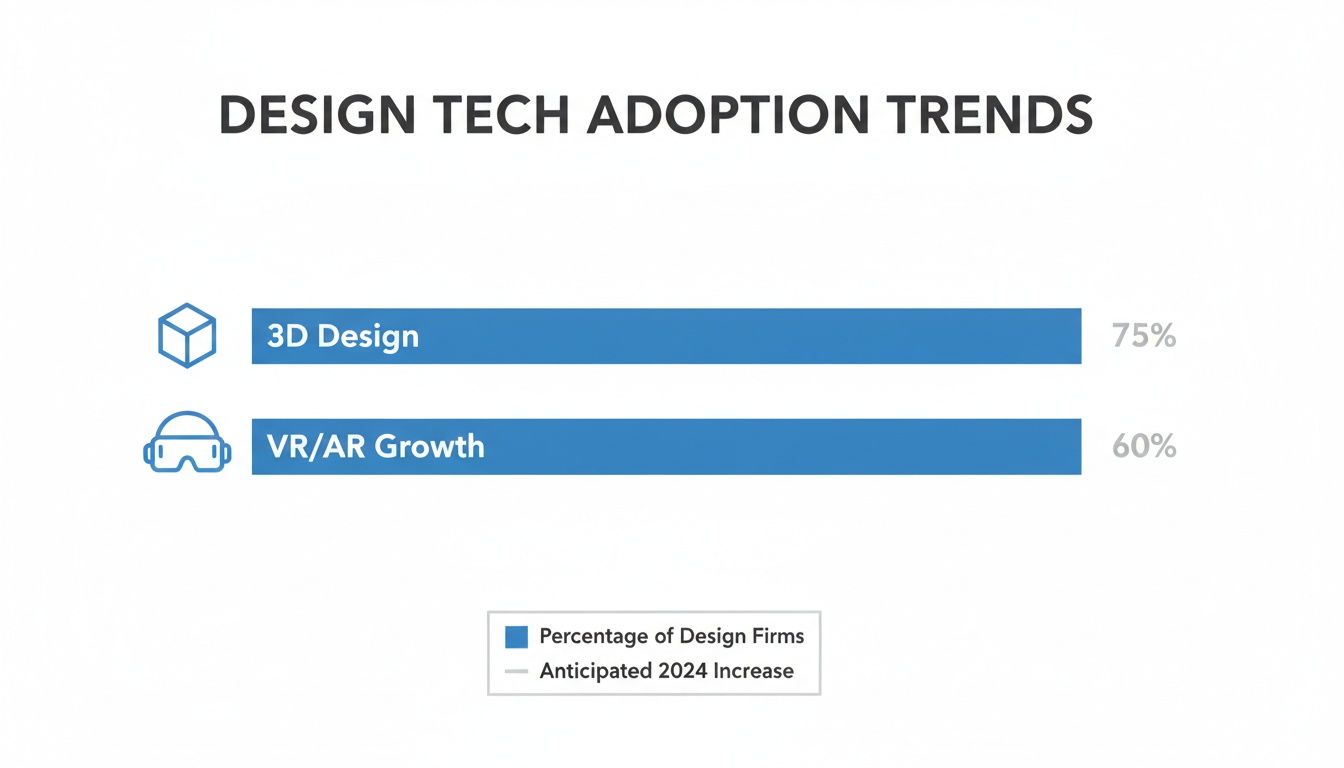
With a 75% adoption rate for 3D design and 60% growth in VR/AR, it’s clear that seeing is believing. This is why apps with strong visualization features are becoming so essential.
Solving A Common Challenge: A Head-To-Head Scenario
Let’s imagine a common problem: you have a small living room in your White Marsh home and you want to find the best furniture layout to maximize space without it feeling cramped.
Using Houzz: You’d start by searching for "small living room layout ideas." You’d find hundreds of inspiring photos, which might spark ideas you hadn't considered, like using a loveseat instead of a full sofa. You could then find a specific loveseat on their marketplace and use the AR feature to see if its scale feels right. But you couldn't easily map out the entire room with all your furniture.
Using Planner 5D: Here, you'd start by creating an accurate 2D floor plan of the room. You’d add your existing furniture (approximating them from the app's library) and then drag them around to test different arrangements. You could instantly see if there's enough room to walk around the coffee table or if an armchair blocks the doorway. The 3D view would give you a realistic sense of how crowded each layout feels.
The Verdict: For pure inspiration and product visualization, Houzz is the clear winner. But for detailed spatial planning and layout optimization, Planner 5D takes the cake.
Honestly, a lot of people use both. They find inspiration on Houzz and then test out those ideas in a more structured tool like Planner 5D. For a broader look at digital tools that can help, check out our guide on the top home renovation apps for your dream space.
When you work with me, we take this process a step further. We can take the ideas you've gathered from these apps and plug them into my proprietary visualization tools. This lets you see exactly how your chosen flooring, countertops, and cabinets will look in your new home in Harford County, bridging the gap between a great idea and a beautiful reality.
Putting Design Apps to the Test in Real Homes
It’s one thing to read about features, but how do these tools actually hold up when you’re staring down a real design dilemma? Let's walk through a couple of common scenarios to see how these apps can solve everyday problems and make your projects a whole lot less stressful.
Imagine you're about to move into a great new place in White Marsh, Maryland. The big question nagging you is, "Will my beloved, oversized sectional sofa actually fit in the new living room?" This is where an app like Magicplan becomes your secret weapon.
Scenario 1: Tackling the Pre-Move Furniture Puzzle
Instead of guessing with a tape measure or trying to decipher confusing blueprints, you can use Magicplan to whip up a surprisingly accurate floor plan in just a few minutes. It uses your phone's camera to scan a room and figure out the dimensions for you. You can do this during a quick walkthrough of a home you're considering.
Once you have that floor plan, it's game time.
Input Your Furniture Dimensions: Just measure your sectional and pop it into the app as a custom piece.
Test Different Layouts: Now for the fun part. Drag and drop your virtual sofa into different spots to see what works.
Check for Flow: Make sure you can still walk around comfortably without bumping into things. You don't want to block a key doorway or your favorite window.
This simple process takes a huge weight off your shoulders before moving day. You’ll know for sure if your furniture is going to work, or if you need to start shopping for a new piece before the truck even shows up.
The real power here is foresight. An app lets you solve spatial problems on your phone before they become back-breaking physical ones. You save time, money, and the frustration of shoving a sofa around a room three times only to realize it’s a no-go.
Scenario 2: Conquering Kitchen Finish Indecision
Alright, let's tackle another classic design hurdle. You're getting ready to choose the finishes for your new kitchen in Baltimore County. You’ve been dreaming of dark green cabinets, but you're nervous they'll make the space feel like a cave. You're also stuck between a clean, white quartz countertop and a more dramatic, veined marble-look option.
This is the perfect job for a visualizer app like Homestyler or Planner 5D. These tools are fantastic for playing with different materials and colors without any commitment.
Here’s how you’d use it:
First, you’d build a basic 3D model of your kitchen. It doesn't need to be perfect—just a rough sketch of your cabinet layout and counter space.
Next, you can digitally "paint" the cabinets that shade of green you love and see the effect instantly.
Then, you can swap out different countertop materials to see what pairs best with your cabinet choice.
Getting that immediate visual feedback is a game-changer. You might find that the green cabinets look incredible with the simple white quartz but feel way too busy with the veined marble. Or maybe you'll realize a slightly lighter shade of green is the perfect compromise.
When my clients in Harford County or Edgewood are personalizing their new homes, this is exactly the kind of prep work that makes the design process fun instead of stressful. You can use these apps to explore your own style, and then we can use my proprietary visualization tools to see exactly how your final selections of flooring, cabinets, and tile will look in your specific home. It’s the perfect combination to make sure the vision in your head comes to life perfectly.
Bringing Your App-Based Vision to Life
So, you’ve spent hours playing with one of these interior design apps. You’ve tweaked layouts, found a style that just clicks, and now you have a perfect little digital picture of your dream space. That’s a brilliant start. But how do you get that vision off the screen and into your actual home? This is where the real fun begins—turning those great ideas into something you can touch and feel.

Think of your app design as the perfect jumping-off point. It’s the visual that gets the conversation started. When you show me a flooring type, a countertop material, or a cabinet style you found in an app, we can make it happen. My entire process is built to translate those digital concepts into the real, high-quality finishes that will go into your new home.
It's easy to see why these tools are exploding in popularity. The market for this kind of tech was valued at a massive USD 5.37 billion and is expected to hit USD 9.66 billion by 2030. That growth is fueled by a global boom in home remodeling and personalization—proof that more and more people want a direct hand in creating their living spaces.
From Digital Mood Board to Your New Home
My clients get to use some pretty special visualization tools that take things a step further than what most apps can do. We'll take the ideas you've gathered—like a color palette you’re obsessed with—and apply them directly to the materials and layouts available for your actual home. It’s the best way to make sure there are no "I thought it would look different" moments down the line.
Practical example: Let's say you used an app and landed on the perfect shade of gray for your kitchen cabinets. We can then use my visualizers to see exactly how that color looks next to the specific granite countertops and hardwood flooring options we offer. You get a genuinely realistic preview. If you need more help getting your colors just right, our guide on how to choose paint colors for your home is a great resource.
The real magic happens when you combine your app-generated plans with expert guidance. It’s the secret to a smooth project and ensures the final selections for your new home in Harford or Baltimore County are a perfect match for your vision.
Making Your Vision a Reality
This whole thing is a team effort. You bring the inspiration, and I bring the tools and hands-on experience to get it done right. To get a better feel for how digital tools can create such realistic previews, this step-by-step guide to virtual staging is a fantastic read.
By working together, we can translate your digital dream into a beautifully finished home you'll absolutely love coming home to.
Alright, let's figure out how to pick the right design app for your project without getting lost in all the options. It can feel like a crowded field, but asking yourself a few key questions upfront will point you in the right direction and save you a ton of headaches.
Think of it as a quick gut check before you dive in. A little planning now means less frustration later.
What’s the Main Goal Here?
First things first: what are you actually trying to do? Pinpointing your primary goal is the fastest way to narrow the field.
Just need ideas? If you're at the very beginning and just want to soak up some inspiration, you can't go wrong with an app like Houzz. It’s basically an endless digital lookbook.
Need a solid floor plan? When it's time to get serious about room dimensions and figuring out where things will fit, you'll need a tool built for that. Something like Magicplan or Planner 5D is what you're looking for.
Want to "see" furniture in your room? If the goal is to visualize a specific couch in your living room, you need an app with solid augmented reality (AR). This is where something like IKEA Place really shines.
Knowing your main mission instantly cuts out the noise. After all, you wouldn't grab a simple AR viewer to map out a full kitchen remodel.
Be Realistic About Your Skills and Budget
Next, let's be honest about your comfort level with technology and how much you're willing to spend. Some of these apps are super simple and feel like a game, while others have a bit of a learning curve. If you're not a tech whiz, look for a straightforward drag-and-drop interface.
Money is also a factor. Plenty of apps have amazing free versions that are more than enough for simple projects. But if you're chasing after photorealistic 3D renderings or need access to a complete library of designer furniture, you'll probably need to spring for a paid plan.
This isn't about finding the "best" app—it's about finding the best app for you. The idea is to avoid downloading and deleting a dozen different tools and instead find the one that helps you bring your vision to life.
When you're ready to pick out finishes for your new home in White Marsh or anywhere in Harford County, having these initial ideas mapped out is a huge head start. It gives us a solid foundation to build on with my hands-on service and proprietary visualizers. We can then make sure the flooring, cabinets, and tile we select are a perfect match for the space you’ve already started to create.
Got Questions About Home Design Apps?
Jumping into the world of home design apps usually brings up a few questions. It's totally normal to wonder which one is right for you, or just how accurate they really are. Let's clear up some of the most common questions so you can get started with confidence.
Think of this as your quick-start guide to figuring out your options and setting the right expectations for what these cool tools can actually do.
Which Interior Design App Is Best for a Total Newbie?
If you're just starting out and the whole thing feels a bit intimidating, don't sweat it—some apps are built just for you. For pure inspiration and seeing how different pieces might look in your space, you can't go wrong with Houzz. It’s less about technical drafting and more about discovering styles and products, which makes it super easy to use.
But if you want to try your hand at a simple floor plan, Magicplan is fantastic. It uses your phone's camera to do most of the heavy lifting, letting you map out a room in minutes without getting tangled up in complicated tools. Both are great ways to dip your toes into digital design.
Can I Actually Buy Furniture and Decor Through These Apps?
Yes, you absolutely can! A lot of the best home interior design apps have built-in shopping, which is a massive time-saver. It makes the whole process, from inspiration to purchase, feel much more connected.
Houzz: Think of this platform as a giant home goods marketplace that happens to have design tools. You can browse millions of photos, find something you love, see it in your room using AR, and buy it—all without leaving the app.
Wayfair & IKEA Place: These are retail apps first and foremost. Their main goal is to sell furniture, but they come with powerful AR tools so you can "try before you buy" and make sure that new armchair actually fits your corner.
This kind of integration really simplifies things, making it easier to bring your vision to life without juggling a dozen different websites and wish lists.
How Accurate Are the Measurements in These Apps?
This is a really important question, and the answer is: they’re surprisingly good, but with a small catch. Apps that use your phone's camera and AR technology can give you some very reliable measurements for initial planning.
The accuracy gets even better on newer iPhones and iPads that have LiDAR scanners. This tech uses light to measure distance with incredible precision, creating floor plans that are often very close to what a pro would measure.
However, when precision is an absolute must—like ordering custom kitchen cabinets or getting countertops cut—you should always follow up with a real tape measure. Think of the app's measurements as a fantastic guide for mapping out a layout, not the final word for construction.
For my clients choosing the finishes for their new homes in communities across White Marsh and Edgewood, Maryland, these apps are an amazing first step. You can play around with layouts and styles, and then we can use my own visualization tools and hands-on service to lock in every detail, making sure your choices for flooring, tile, and cabinets are a perfect fit.
Ready to turn your design ideas into reality? I go a step further than the apps, offering my clients unique proprietary visualization tools and hands-on service to help you select the perfect flooring, countertops, and cabinets for your new home in Baltimore County or Harford County. Let's bring your dream space to life. Start customizing your new home today!
Comments